Now Reading: GUI vs CLI: Graphical vs Command-Line Interfaces
-
01
GUI vs CLI: Graphical vs Command-Line Interfaces

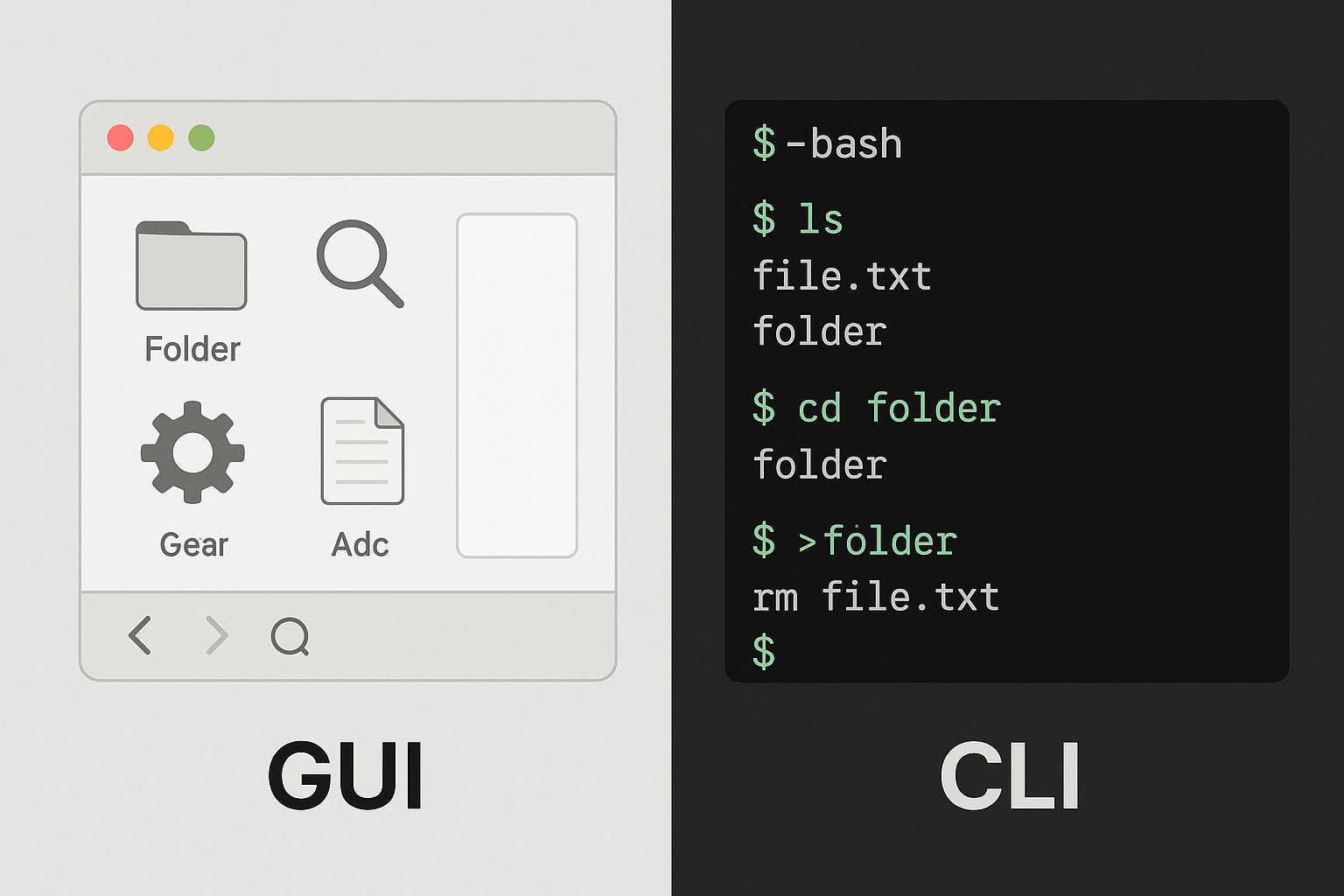
Overview: GUI vs CLI — definitions and context
Graphical User Interfaces (GUI) and Command-Line Interfaces (CLI) have evolved to serve different business needs, user skill levels, and operational environments. A GUI focuses on visual elements, direct manipulation, and immediate feedback through windows, icons, and controls. A CLI, by contrast, relies on text-based commands, scripting, and precise control through keyboard input. In practical terms, organizations choose between these interfaces based on task complexity, the rate of repetition, the level of automation required, and the environment in which the work is performed.
Historically, GUI adoption accelerated when users demanded easier onboarding, faster pattern recognition, and reduced error rates for non-technical staff. CLI adoption, meanwhile, intensified in systems administration, automation, and software development where repeatability and remote operation drive efficiency. Today, many teams run hybrid stacks where GUIs provide interactive configuration and monitoring, while CLIs handle automation, batch processing, and remote management. Understanding the strengths and limits of each interface helps stakeholders design workflows that minimize risk while maximizing throughput and accuracy.
Advantages of Graphical User Interfaces
GUIs excel in tasks that benefit from visual exploration, exploratory analysis, and human-driven discovery. They lower the barrier to entry for new users and accelerate task initiation by converting abstract operations into tangible controls and immediate feedback. In business environments where configuration choices are frequent and error tolerance is low, gui-based tools can shorten the learning curve and improve consistency across teams.
Beyond usability, GUIs support complex workflows through wizards, dashboards, and real-time visualizations. This makes them well-suited for design work, data visualization, and incident response scenarios where operators need to grasp relationships at a glance. The following advantages often drive the decision to deploy GUI-centric tools in appropriate contexts:
- Visual discovery and intuitive navigation through panels, menus, and drag-and-drop actions
- Reduced cognitive load for repetitive or pattern-based tasks, thanks to guided workflows
- Immediate feedback on actions, including inline validation and contextual help
- Enhanced accessibility and onboarding for non-technical users through consistent UI patterns
- Rich media support, including charts, previews, and real-time monitoring dashboards
Advantages of Command-Line Interfaces
CLI environments shine when the goal is speed, precision, and repeatability. Expert users quickly master keyboard-driven navigation, scripting, and parameterized operations that scale across dozens or hundreds of systems. In enterprise contexts—especially where servers are headless, automation is central, and remote management is routine—the CLI becomes the backbone of reliable operations.
Key advantages of CLIs include strong capabilities for automation, scripting, and reproducibility, which are critical for consistency across development, testing, and production environments. The following benefits are commonly cited by teams that rely on CLI-based workflows:
- Automation through scripts and batch processing for repeatable tasks
- High keyboard efficiency and rapid command execution for power users
- Lower resource footprint on servers and virtual environments
- Remote administration and scripting across diverse platforms
- Consistent, auditable workflows that are easy to version control
Use-case scenarios and decision drivers
Choosing between GUI and CLI is rarely a binary decision. In practice, teams adopt a hybrid approach that aligns interface choice with the task, the user profile, and the operational constraints of the environment. When evaluating scenarios, organizations consider factors such as task duration, frequency, error risk, and the need for automation, auditability, and scalability.
Below is a structured view of common scenarios and the reasoning behind choosing GUI, CLI, or a blended approach in each case:
- Desktop-oriented configuration and design tasks: When engineers and designers need visual feedback, drag-and-drop workflows, and real-time previews, GUI-based tools can accelerate productivity and reduce misconfigurations.
- Server administration and headless environments: For remote management, automation, and reproducible deployments, CLI tools combined with scripts or configuration management frameworks are preferred.
- Data processing pipelines and batch jobs: CLI interfaces enable straightforward scripting, scheduling, and integration with CI/CD pipelines, improving traceability and repeatability.
- Monitoring, alerting, and incident response: GUI dashboards provide situational awareness for on-call teams, while CLI utilities support rapid data extraction and automation of remediation steps.
- Prototyping and experimental workflows: A hybrid model allows rapid exploration in a GUI while capturing repeatable operations in scripted CLIs for later productionization.
Tradeoffs, performance, and security considerations
Each interface type introduces tradeoffs that affect performance, security, and governance. GUIs often trade raw efficiency for usability, requiring more memory for rendering interfaces, panels, and widgets. In environments with limited resources or high-density server farms, CLIs tend to scale more predictably and predictably under load. Security considerations also diverge: GUI tools may expose more attack surfaces through exposed services, while CLIs can be tightly controlled via role-based access, keys, and auditable command histories. A balanced strategy accounts for these factors across the lifecycle of tools and workflows.
From a governance perspective, the choice between GUI and CLI impacts how tasks are documented, monitored, and audited. CLI commands can be version-controlled and replayed, enabling rigorous reproducibility, but they require disciplined change management to avoid drift. GUI configurations delivered through centralized management interfaces reduce drift when they rely on standardized templates and policy-driven controls. Organizations often adopt policies that combine the strengths of both worlds, ensuring critical operations remain auditable while still offering user-friendly experiences for routine tasks.
Implementation notes, governance, and best practices
When designing tooling for mixed teams, it helps to define clear roles, reuse trusted components, and implement consistent interfaces across both GUI and CLI variants. For developers and administrators working with Python in particular, a common pattern is to provide a GUI frontend on top of well-defined CLI-backed services or APIs. This approach preserves scriptability and automation while delivering accessible controls for non-expert users. Frameworks such as Tkinter, PyQt, and Kivy are often used to create cross-platform GUI frontends that speak to the same backend logic as the CLI tools, ensuring a single source of truth for business rules and data processing.
Infrastructure teams should also invest in automation-first design: create modular components that can be invoked from both GUIs and CLIs, implement centralized logging and monitoring, and enforce access controls that align with organizational security standards. Documentation, training, and change management should emphasize the intended use cases for each interface, with guardrails to prevent accidental cross-over that could undermine security or reliability. Finally, consider performance profiling and user testing to identify where a GUI shortcut reduces cycle time without sacrificing traceability and auditability.
FAQ
When should you choose GUI over CLI in an enterprise context?
In enterprise settings, GUIs are typically favored for tasks that require visual exploration, interactive configuration, and real-time feedback for non-technical users. They are also beneficial when onboarding speed and human-centric workflows are priorities, such as in design, data visualization, or incident-response dashboards. CLIs are preferred for automation, batch processing, remote administration, and environments where repeatability and auditable execution are critical. A practical approach is to provide a GUI for day-to-day operations and a robust CLI for automation and remote management, ensuring that both paths access the same underlying services or APIs.
Can a team operate effectively with a hybrid GUI/CLI approach?
Yes, a hybrid approach can yield significant productivity gains when the two interfaces complement each other. Design principles include sharing core logic behind a common API, ensuring consistent data models, and using the CLI to script and automate GUI-driven workflows. Teams should establish governance around which tasks belong in the GUI versus the CLI, provide training for both paths, and maintain thorough documentation so handoffs between interfaces remain smooth and auditable.
What metrics help compare GUI and CLI productivity?
Useful metrics include task completion time, error rates, throughput (tasks per hour), and learning curve duration for new users. Additional indicators include automation coverage (the percentage of repeatable tasks scripted), change and incident frequency, and the auditability of actions (log completeness and traceability). Long-term success also depends on user satisfaction, measured through qualitative feedback and surveys that capture ease of use, perceived control, and perceived risk.
Are there best practices for securing CLI and GUI tools?
Best practices emphasize centralized access control, role-based permissions, and strong authentication for both interfaces. For CLIs, use secure storage for credentials, rotate keys, and implement command history auditing with tamper-evidence. For GUIs, enforce secure sessions, input validation, and restricted feature sets by role. Across both paths, maintain a single source of truth for configuration, enforce least privilege, monitor usage with logs and alerts, and regularly review access policies and tool inventories to mitigate drift and risk.
How can Python developers leverage GUI toolkits for cross-platform admin tools?
Python developers can build cross-platform admin tools by selecting GUI toolkits that align with their deployment targets and performance requirements. Tkinter is lightweight and ships with Python, making it a quick option for simple admin utilities. PyQt and PySide offer more sophisticated widgets and a polished look, suitable for enterprise-grade dashboards. Kivy supports multi-touch and mobile-style interfaces if that aligns with your needs. In all cases, design the GUI to call into the same backend services or CLI-wrapped APIs, maintain clear separation of concerns, and provide robust error handling and logging to ensure reliability in production environments.