Now Reading: Histogram vs Bar Chart: Differences and When to Use Each
-
01
Histogram vs Bar Chart: Differences and When to Use Each

What is a Histogram?
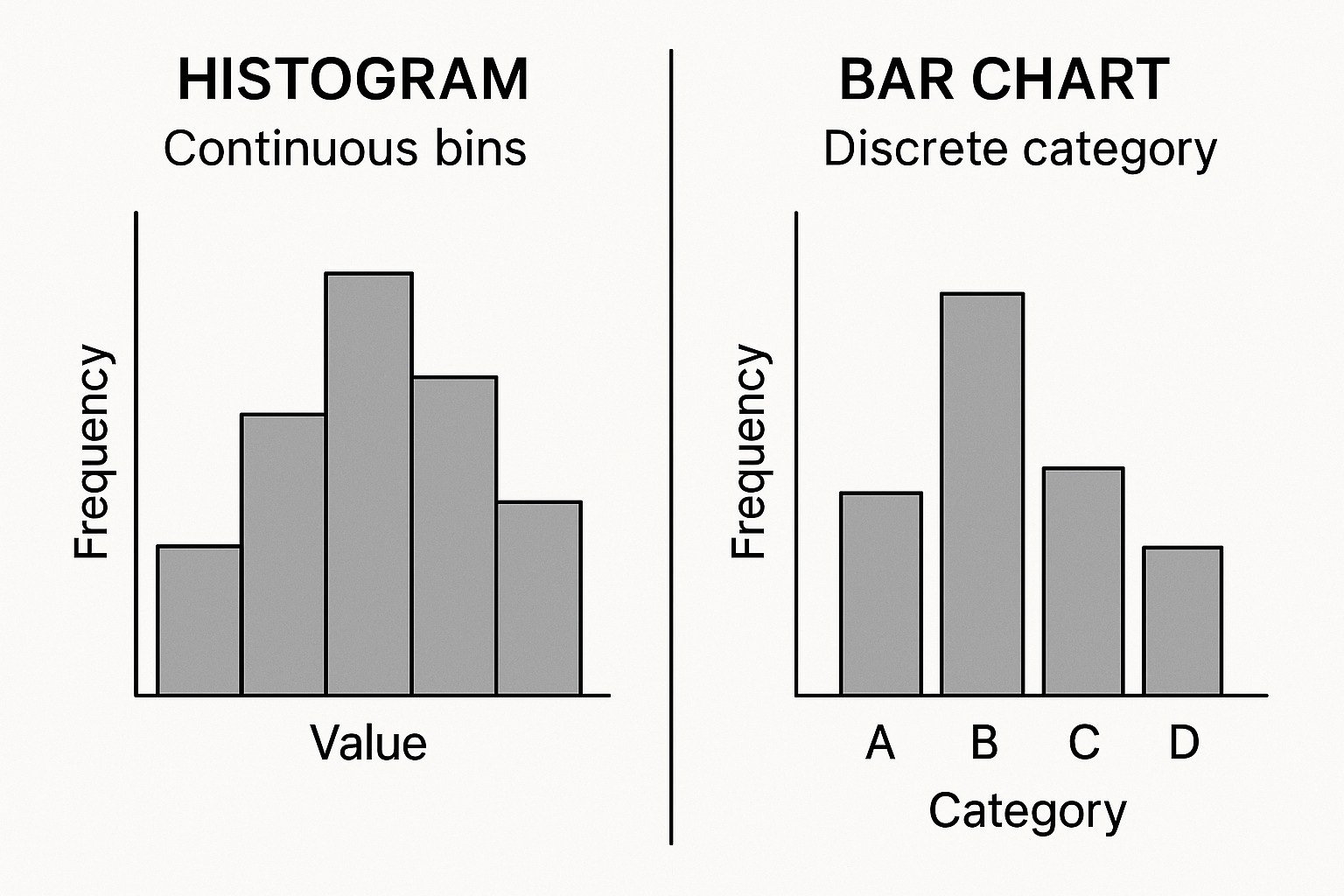
A histogram is a graphical tool designed to convey the distribution of a numeric variable by grouping data into intervals, or bins, and showing how many observations fall into each bin. Unlike a bar chart that measures discrete categories, a histogram treats the x-axis as a continuous numeric scale, with the width of each bin representing a range of values. The height of each bar reflects the frequency or density of observations within that range, producing a shape that reveals patterns such as skewness, modality, and the presence of outliers. In practice, histograms help analysts understand where values cluster and how spread out the data are, which informs decisions about modeling, transformations, and risk assessment.
Because histograms encode distribution rather than category labels, the choice of bin width and the number of bins can substantially affect interpretation. Too few bins can smooth away important features, while too many bins can amplify noise and obscure the overall shape. Histograms also support enhancements such as overlaying multiple distributions with transparency to compare groups, or using density plots in lieu of heights when the sample size differs across groups. While they emphasize the distribution of a single numeric variable, histograms are less suited for directly comparing categories or attributes that are inherently non-ordered or qualitative.
What is a Bar Chart?
A bar chart is designed to compare values across discrete categories. Each category is represented by a bar, whose length or height corresponds to a numeric measure such as count, proportion, or average. The x-axis typically lists distinct categories, and the bars are usually separated with small gaps to emphasize their independence, though the orientation can be vertical or horizontal. Bar charts are particularly effective for ranking, identifying the largest or smallest groups, and communicating simple, category-level differences to business stakeholders.
Bar charts can also display multiple series using grouped or stacked bars, enabling comparisons across subcategories or time periods. When presenting categorical data, clean axis labeling, consistent scales, and carefully chosen color palettes are essential to minimize cognitive load. While bar charts can be used to show distributions in a broad sense when the data are categorical, they do not convey the detailed shape of a numeric distribution as histograms do, so the choice between the two depends on the underlying data and the decision question at hand.
Key Differences
Histograms and bar charts serve distinct purposes and encode information differently. The following differences capture the core contrasts most analysts encounter in practice:
- Data type: Histograms summarize a single continuous numeric variable; bar charts compare values across a set of discrete categories.
- Binning vs categories: Histograms rely on numeric bins that partition the data range; bar charts rely on explicit category labels without numeric binning.
- Spacing and axis treatment: Histogram bars typically touch to emphasize continuity; bar charts usually have gaps between bars to denote separate categories.
- Axis interpretation: In histograms, the x-axis represents value ranges, while the y-axis shows frequency or density; in bar charts, the x-axis shows category labels and the y-axis shows the measured quantity.
- Analytical focus: Histograms reveal distributional shape, spread, and outliers; bar charts highlight relative sizes, rankings, and category differences.
When to Use Each
Choosing between a histogram and a bar chart hinges on the data type and the decision question. The guidance below helps align chart type with objectives and audience needs:
- To analyze the distribution of a continuous numeric variable, use a histogram. This is the most direct way to examine shape, skewness, multimodality, and the presence of outliers.
- To compare counts or proportions across categories, use a bar chart. This makes it easy to see which category leads or lags and to communicate ranking to non-technical audiences.
- When you have multiple groups and want to compare distributions, consider faceted histograms or multiple panels (small multiples) to preserve the numeric interpretation of bins while enabling group comparisons.
- To compare a numeric statistic across categories (for example, average revenue by region), prefer a grouped or stacked bar chart if the statistic is category-level and discrete.
- In presentations, use histograms to discuss data quality, variability, and risk, while bar charts are effective for performance dashboards and category-level targets.
Design Considerations
Effective histograms and bar charts share a set of best practices, but each chart type imposes its own constraints. The following considerations help ensure clarity, accuracy, and accessibility:
- Bin width and count: For histograms, choose a bin width that balances detail with legibility. Consider data-driven rules of thumb (such as Sturges’ or Freedman–Diaconis) as starting points, then adjust based on the data and the audience.
- Labeling and scales: Always label axes clearly. In histograms, include units for the value range; in bar charts, label categories and ensure y-axis starts at zero to avoid misinterpretation.
- Color and contrast: Use color to emphasize differences without implying additional meaning. Ensure sufficient contrast for accessibility and consider color-blind-friendly palettes.
- Ordering and readability: In bar charts, ordering bars by height (ascending or descending) improves readability and storytelling. In histograms, the natural order is the numeric value of the bins; avoid rearranging bins.
- Accessibility and alternative text: Provide descriptive captions or alt text for screen readers, and ensure that numeric values can be inferred from axis ticks or accompanying data where possible.
Common Pitfalls
Even well-intentioned charts can mislead if subtle choices are overlooked. Common pitfalls include using too many or too few bins in histograms, which can obscure or distort the distribution; applying identical bin widths across groups without justification, which can bias comparisons; and hiding important context by omitting axis labels or scaling inconsistently across charts. In bar charts, a frequent mistake is mixing categories that are not inherently ordered and relying on decorative colors rather than meaningful contrasts. Finally, both chart types must be interpreted in light of sample size; very small samples can produce volatile visuals that do not reflect underlying patterns.
Practical Examples
Consider a data set containing purchase amounts from an online retailer. A histogram of order values (in dollars) can reveal whether most orders cluster around a typical basket size, whether there is a long tail of high-value orders, and whether the data are right-skewed. If you want to compare performance across product categories, a bar chart showing total sales by category makes it easy to identify which categories contribute most to revenue, which performs next best, and where to focus marketing efforts. When the goal is to understand how order sizes vary by customer segment, you might combine both visuals: a histogram of order values faceted by segment, paired with a bar chart of average order value by segment. Together, these charts provide a multi-faceted view of distribution and category-level impact that supports data-driven prioritization.
In practice, data teams often use histograms to diagnose data quality issues before modeling—uneven bin counts, gaps in data, or unexpected spikes can signal data collection problems. Bar charts, by contrast, are commonly deployed in executive dashboards to convey performance metrics, target attainment, and market share. The key is to align the visual with the decision question: use a histogram to explore the data distribution, and use a bar chart to communicate comparisons and ranking to stakeholders who rely on quick, actionable insight.
Summary and Best Practices
Histograms and bar charts are complementary tools in a data visualization toolkit. Histograms excel at revealing the shape and spread of a continuous variable, while bar charts excel at comparing discrete categories. By choosing the appropriate chart type, ensuring consistent scales and clear labeling, and applying simple design rules—such as appropriate bin width, zero-based axes for bar charts, and accessible color choices—analysts can convey insights accurately and efficiently. When in doubt, consider the audience and the primary question: distribution or comparison—and select the visualization that communicates the intended conclusion with minimal cognitive load.
FAQ
What is the main difference between a histogram and a bar chart?
The main difference lies in the type of data and how the values are encoded. A histogram summarizes the distribution of a continuous numeric variable by binning data into intervals and measuring frequency or density, while a bar chart compares values across discrete categories, using category labels on the x-axis. Histograms emphasize distribution shape; bar charts emphasize category-by-category comparisons.
When should I use a histogram vs a bar chart?
Use a histogram when your goal is to understand the distribution of a continuous variable—such as height, temperature, or order value—and to identify features like skewness, modality, and outliers. Use a bar chart when you want to compare the sizes or proportions of distinct categories—for example, sales by product category, votes by candidate, or survey responses by option. If you need to compare distributions across groups, consider faceted histograms or separate bar charts by group to preserve clarity.
Can histograms be used to compare groups?
Yes, but typically by using multiple histograms side by side or in a faceted layout rather than a single histogram. Overlaying histograms with transparency is another approach, but care must be taken to avoid clutter when groups are numerous. For direct group comparisons of a numeric statistic, bar charts or box plots are often more straightforward and interpretable.
How do I choose bin width for a histogram?
Bin width selection balances detail and readability. Start with common heuristics (for example, Freedman–Diaconis or Sturges’ rule) to set an initial bin size, then adjust based on data range, sample size, and how easily the distribution communicates the key features. The goal is to reveal meaningful structure without introducing artificial patterns or excessive noise.
Are there accessibility considerations for histograms and bar charts?
Yes. Ensure sufficient color contrast, provide descriptive axis labels, and avoid conveying information solely through color. Include textual annotations or captions that summarize key takeaways, and consider offering data values or a data table alongside visuals for readers who use assistive technologies or require precise numbers. When possible, keep charts simple and avoid stacking too many elements in a single view.